Setup & admin
Adding the Booking Widget to Your Website
Embed your BukaTime booking page directly into your own website with a copy-paste code snippet.
If you have a website, you can let clients book without ever leaving it. The booking widget is your full BukaTime booking page, living inside your own site — the same page clients see at your BukaTime address. You copy a snippet, paste it into your website, and you're done.
Accessing the Widget Settings
- Go to Studio Configuration → Booking Widget.
The Snippet
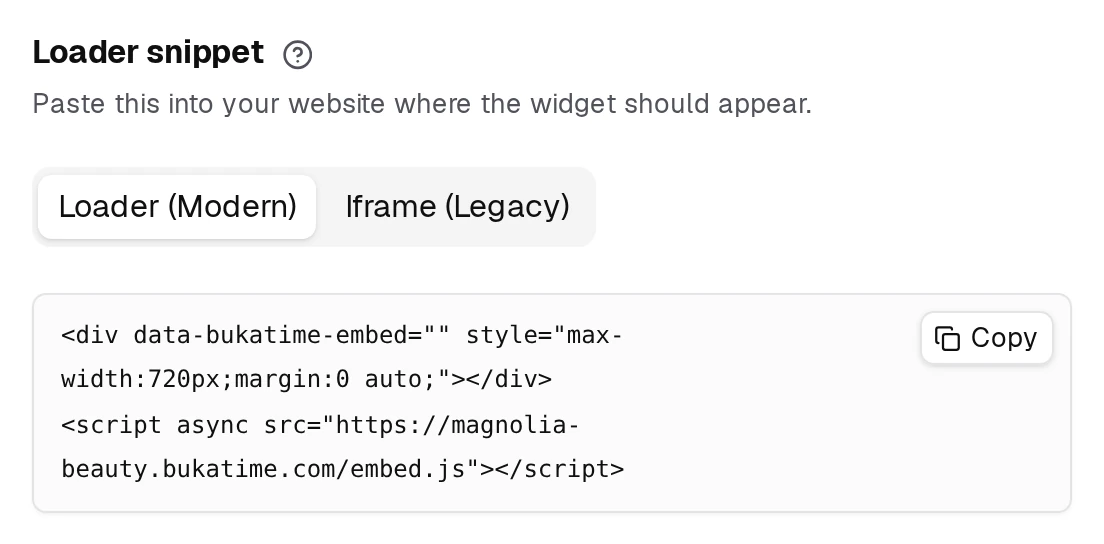
There are two snippet options. Copy the one that matches how your website works.
Loader (Modern) — Recommended
<div data-bukatime-embed="" style="max-width:720px;margin:0 auto;"></div>
<script async src="https://yourstudio.bukatime.com/embed.js"></script>
The loader script handles everything automatically: it creates the iframe, resizes it to fit the content, and picks up any future configuration changes without you needing to update the code again.
Iframe (Legacy)
<iframe
  src="https://yourstudio.bukatime.com/embed"
  style="width:100%;max-width:720px;height:720px;border:0;"
  loading="lazy"
  allow="payment"
  title="Booking widget"
></iframe>
Use the iframe snippet if your website platform does not allow loading external scripts. The height is fixed at 720 pixels by default — you can edit the height value in the snippet if you need more or less space.
Both snippets above show
yourstudioas a stand-in. The page builds them with your own address already filled in, so copy from there rather than typing one out — and set a website address under Studio Configuration → General first, because nothing is generated until you have one.
Copying the Snippet
- Select the tab for the snippet type you want (Loader (Modern) or Iframe (Legacy)).
- Click the Copy button in the top-right corner of the code box.
- Paste into your website's HTML where you want the widget to appear.
Live Preview
To the right of the snippet (or below on smaller screens), the page shows a live preview of your booking widget — the same /embed page your clients will see.
- The preview updates automatically as you change your studio configuration.
- Use the refresh icon in the preview header to reload the preview manually.
- The preview height adjusts automatically to match the full content height.
If you have not set a website address yet, the preview area shows a placeholder message until you save one.
Related
- Your BukaTime WebsiteEvery studio gets a working site on day one — here is how to make it yours.
- General SettingsYour studio's name, its web address, and where you are.
- Setting Up Client NotificationsChoose which confirmations and reminders your clients receive.
- Creating and Managing AppointmentsCreate, edit, move, and cancel appointments on the calendar.